AI exterior design from a house photo
Explore a new exterior before changing the facade.
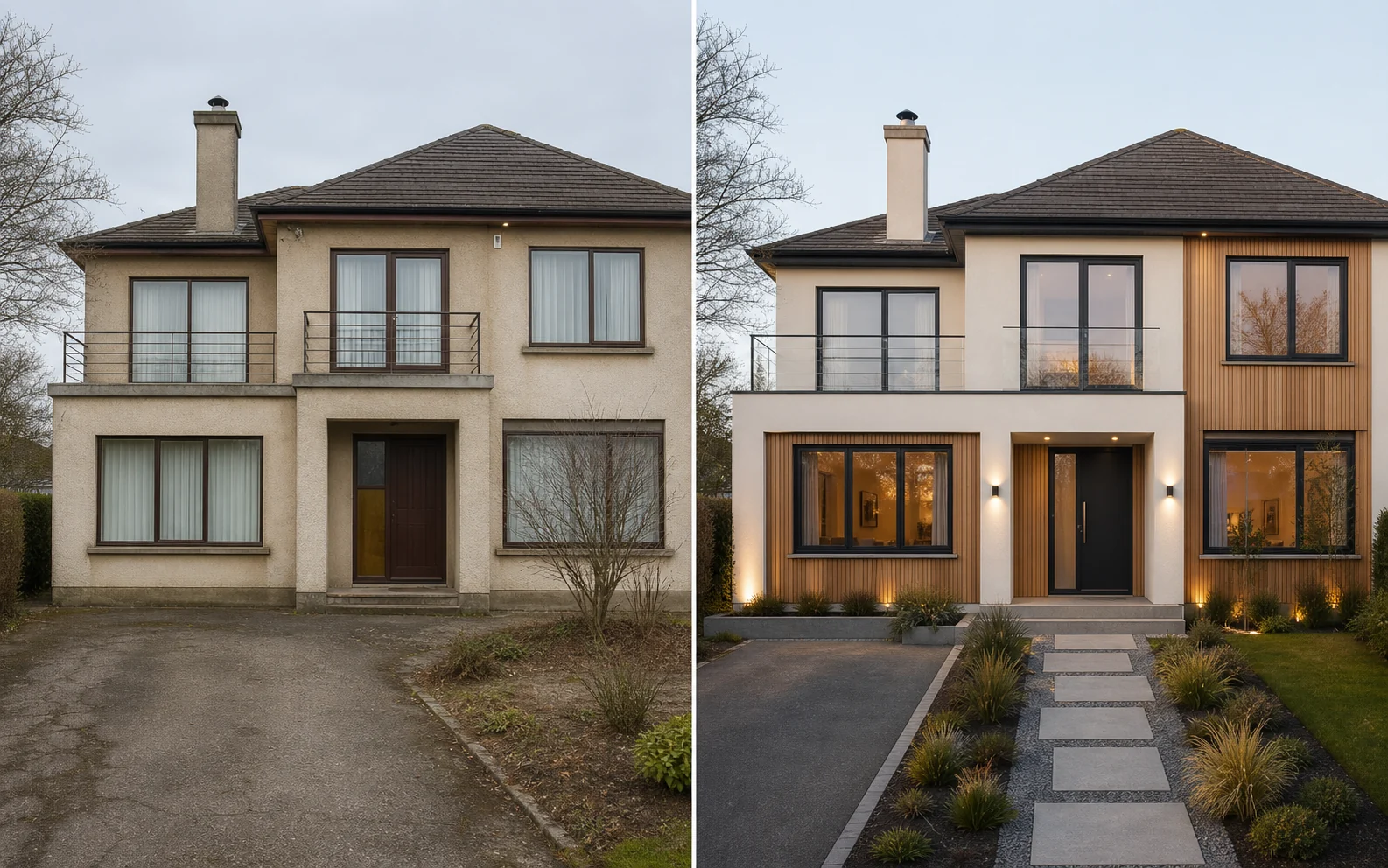
Use a photo of your house to visualize a fresh exterior direction. Compare material character, color contrast, entry details and curb appeal while keeping the main form recognizable.
Curb appeal without pure guesswork
Test the whole facade as one composition.
Exterior decisions interact: siding, render, timber, stone, trim, doors, roof tone and landscaping all change how a house reads. An AI exterior visualizer lets you explore a coordinated direction before ordering samples or commissioning drawings.
12 facade directions
Compare Warm Modern, Nordic Black, Timber and Stone, Mediterranean Villa, Minimal White, Classic Refresh and more.
The existing house as context
Use the current roofline, openings and camera view as the base for a more relevant visual conversation.
Material relationships
Explore how light and dark surfaces, natural textures, trim contrast and entry emphasis could work together.
What to explore
Exterior ideas to compare before renovation
Use generated images to compare a direction and communicate an idea. Keep measurements, specifications and final decisions in the real-world planning process.
- Facade color and material directions
- Siding, timber, stone and render combinations
- Front-door, trim and entrance emphasis
- A classic refresh or contemporary curb-appeal concept
- Visual alignment before requesting samples, drawings and quotes
How it works
From one photo to a useful visual shortlist.
Capture the full elevation
Photograph the facade straight-on when possible and include the roof, ground line and relevant surroundings.
Select a coherent direction
Choose an exterior style and describe constraints, such as keeping the brick, roof or window frames.
Check the idea against reality
Compare with physical samples outdoors, then consult the appropriate designer, engineer, authority and contractor.
Better input, better comparison
Practical photo and planning tips
- Avoid photos dominated by cars, heavy foliage or deep shadow.
- Name surfaces that must remain and materials you want to test.
- Review screen colors only as a direction, never a specification.
- Confirm permissions, weatherproofing, fire and structural requirements.
Questions, answered
What to know before you visualize.
Can I redesign my house exterior from a photo?
Yes. Upload a clear facade photo, choose an exterior direction and generate a concept based on your existing house image.
What exterior styles are included?
The 12 options include Warm Modern, Nordic Black, Timber and Stone, Mediterranean Villa, Coastal, Cottage Modern and Desert Modern.
Will the AI keep my windows and roofline?
The tool aims to keep the building recognizable when structure preservation is selected, but generated images can alter details.
Is this an exterior paint color matcher?
No. It is a broader concept visualizer, not a manufacturer-calibrated paint system. Verify final colors with physical samples.
Keep exploring
More ways to visualize your home.
See the direction before you commit.
Download Room Style AI and create your first visualization free. No account required.
Try Room Style AI free