AI garden design from a real photo
Turn your outdoor space into a garden direction you can see.
Photograph a garden, yard or courtyard and explore a considered outdoor concept. Compare planting character, paths, seating and atmosphere before developing a real landscape plan.
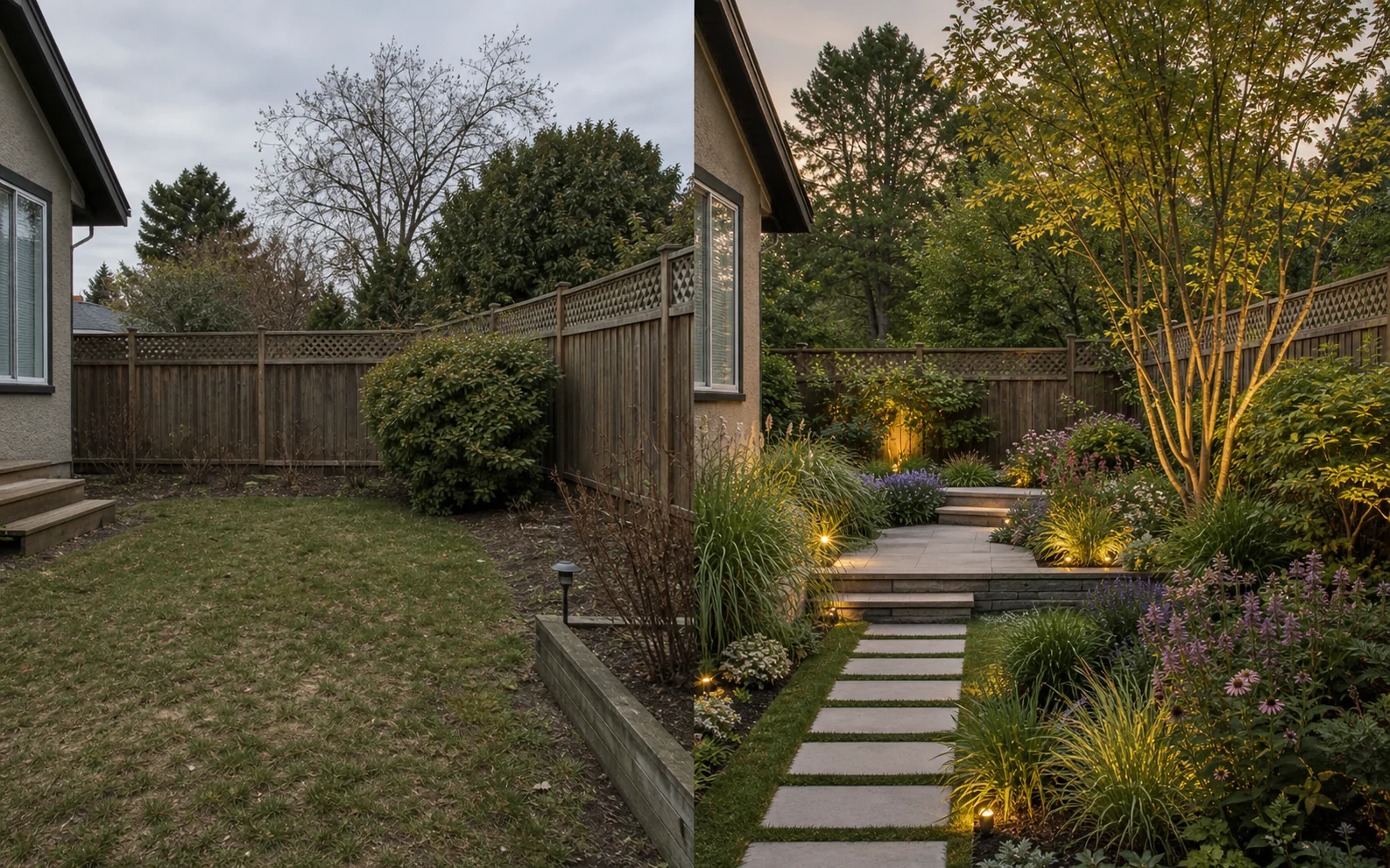
Landscape inspiration in context
Explore the feeling and structure of a garden from one image.
A garden design photo can help you decide whether the space should feel naturalistic, formal, Mediterranean, Japanese or distinctly modern. Room Style AI places that direction into your outdoor view so planting, hardscape and open space are easier to discuss.
12 outdoor directions
Try Naturalistic, Japanese Garden, Formal Courtyard, Mediterranean, Low Maintenance, Woodland, Modern Lines and more.
More than planting
Explore the composition of paths, beds, lawn, seating, screening and outdoor atmosphere in one concept image.
Useful early in the process
Create a visual brief before detailed plant selection, drainage design, measurements and contractor pricing.
What to explore
Outdoor spaces worth testing visually
Use generated images to compare a direction and communicate an idea. Keep measurements, specifications and final decisions in the real-world planning process.
- Backyard and front-garden makeover ideas
- Small courtyard and entertaining-garden directions
- Low-maintenance, pollinator-friendly or family garden character
- Path, planting-bed and seating-area composition
- A shared visual brief for a landscaper or garden designer
How it works
From one photo to a useful visual shortlist.
Show the boundaries
Take a wide, level photo that includes the ground plane, edges of the garden and structures that need to remain.
Choose the garden character
Select a direction and describe priorities such as more privacy, open lawn, dining space or dense planting.
Translate it into a real plan
Define zones and mood, then select plants and materials for your climate, soil, light, drainage and maintenance level.
Better input, better comparison
Practical photo and planning tips
- Photograph in even daylight so boundaries and level changes are visible.
- State what must stay, including trees, sheds, fences and paving.
- Mention how the space is used: pets, dining, privacy or biodiversity.
- Ask a local professional to validate drainage, utilities and plants.
Questions, answered
What to know before you visualize.
Can AI design a garden from a photo?
Yes. Room Style AI can turn an outdoor-space photo into a landscape concept based on the garden direction and instructions you choose.
Which garden styles can I try?
There are 12 directions, from Naturalistic and Japanese Garden to Mediterranean, Woodland, Modern Lines, Pollinator Garden and Small Courtyard.
Is this a garden planner with exact dimensions?
No. It creates visual concepts; it does not produce a scaled planting plan, drainage drawing or construction specification.
Can I keep existing trees or a patio?
You can name features that should remain. Review every concept carefully and use a measured site plan for real work.
Keep exploring
More ways to visualize your home.
See the direction before you commit.
Download Room Style AI and create your first visualization free. No account required.
Try Room Style AI free